 A Lean Journey
 In two earlier posts I wrote about the benefits of a personal kanban and showed my first kanban system. One of the weaknesses of this board was the lack of portability of the system with the amount time I spend out of the office. So I have created digital personal kanban system.
LeanKit Kanban allows you to create a virtual kanban system online. Their software makes it easy to customize your own kanban board, add color, dates, and more. They offer several pricing options to meet all your needs from personal to team editions. The free personal option only allows you to create one kanban board.
Here is the kanban board I made to manage my tasks.
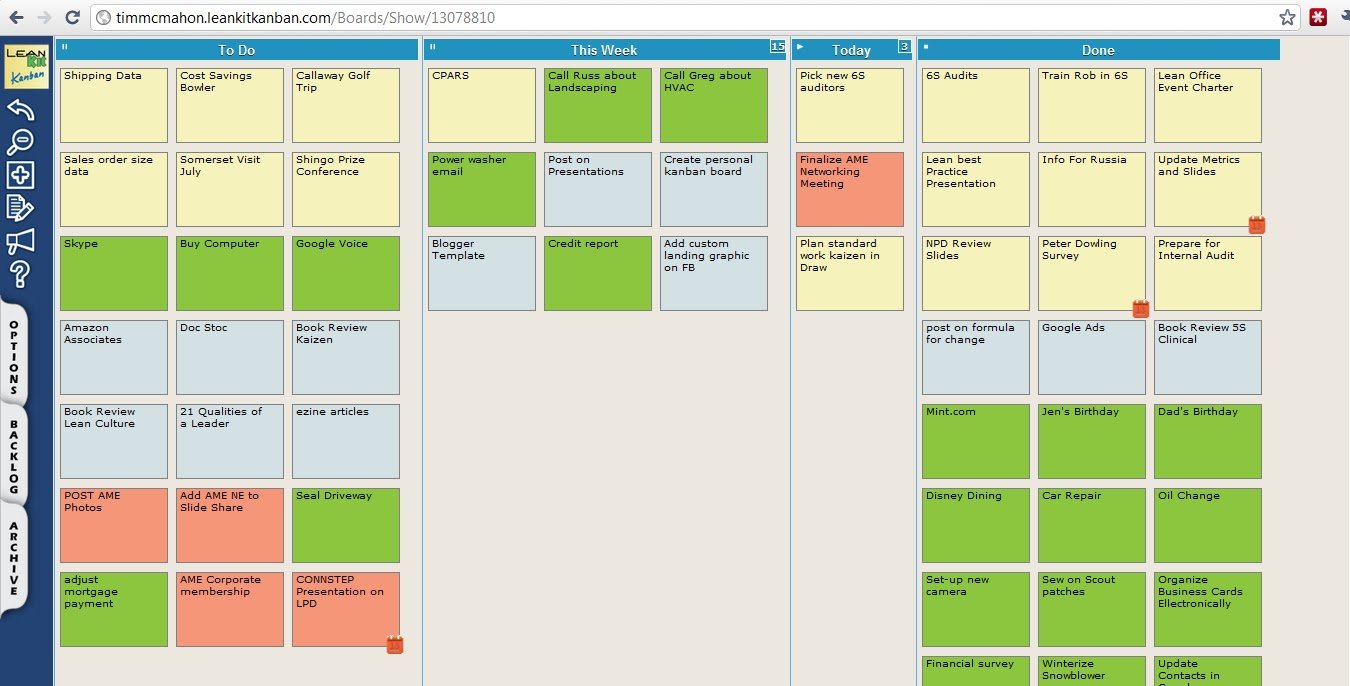
The layout is pretty simple. If you remember my previous non-digital board I used the following rules to create my personal kanban:
1) Establish Your Value Stream – The flow of work I chose was Backlog, This Week, Today, and Done.
2) Establish Your Backlog – I put every task onto a post-it-note, if the task had a due date I put that on the note as well.
3) Establish Your WIP Limit – I limited my Today column to 3 and therefore limited my This Week column to 15
4) Begin to Pull – As I work on the Today column I pull new tasks into Today.
The built in visuals are a great feature of this kanban. The color coding helps me manage all aspects of my life in one place. I use the colors to organize the following grouping of tasks:
Tan – work related tasks: projects, kaizen events, data analysis
Green – personal tasks: kids activities, home projects
Blue – A Lean Journey Blog tasks: new posts, website maintenance
Red – AME tasks: new workshops, social media posting
If tasks are date sensitive that can be added to the the card and a visual date shows in the bottom right of the card. When you move the cursor over the task the date is visible. The date starts out yellow and then turns red if your task is behind. You can see I was behind a couple on my board.
The software offers a number of analytics to help you understand how well you perform. I have not really used this information yet to improve my system but it is there.
As I mentioned in the previous system I use this for tasks that take about 1-2 hours. For smaller tasks I also use a digital system. I use Google Tasks which is a simple To Do List. I prefer this over other electronic To Do Lists for the following reasons:
1) It is simple to use.
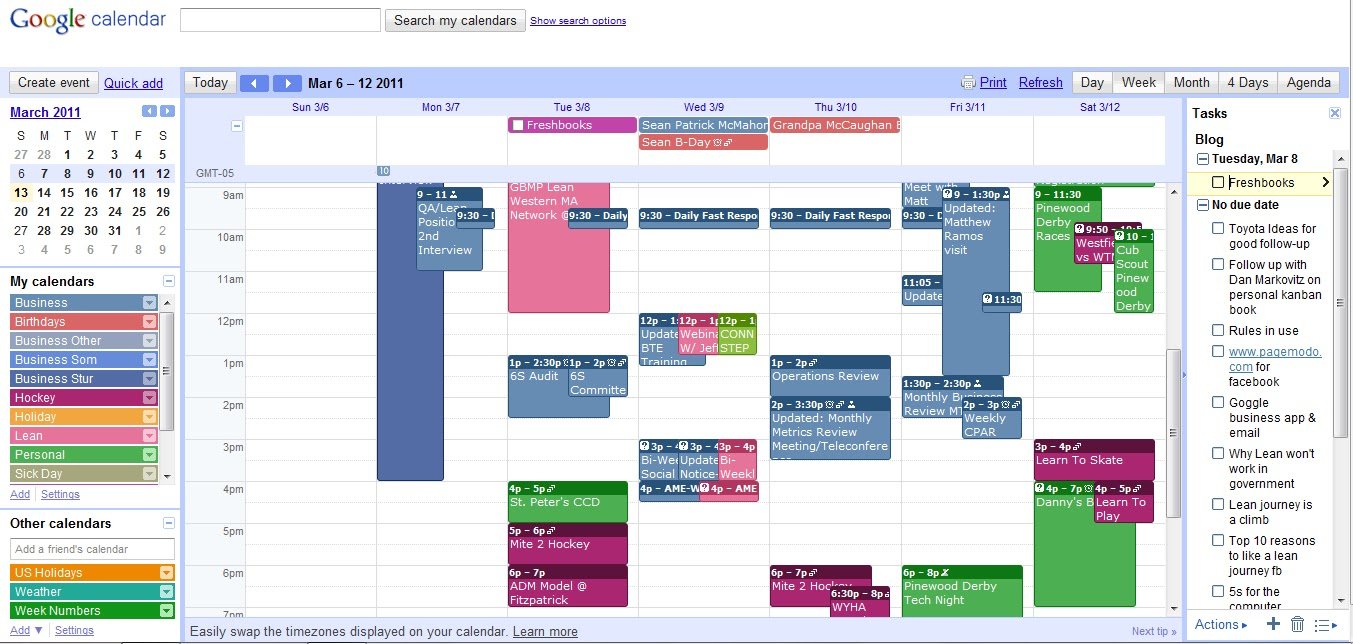
2) It integrates with my calendar Google Calendar.
3) It is available on my Android phone.
4) I have created 4 lists which match the categories of my Kanban board.
Here is what is looks like in my calendar (which is also color coded), on far right side is the tasks. There is a tasks shown due on Tue 3/8 for example.
So how do I make this all work. Well, at the end of each day I spend about 15 minutes planning for the next day. It is scheduled on my calendar. I start with the kanban board by looking at what i completed today. Then I look at the This Week area and move 3 items I need to do tomorrow into the Today column. At the end of the week I plan the following week by looking at my backlog of tasks. Also, in this 15 minutes I look at my Google tasks (generally on my phone) and update the list. I pick 3 things I must do the next day and prioritize them as such. As I go through the day i will add tasks to the tasks and kanban board as they come up. This help me keep from losing those thoughts. Since it is digital it only takes a few seconds.
My most productive time is in the morning and generally my most available. I start with my kanban tasks (at least the first one) and then move to the Google tasks. I should mention I generally don’t check email first thing. I tend to look at email only 3-4 times per day. This usually includes a visit to facebook and twitter since I manage several social channels. I eat lunch in the office most days and use this time to visit all those blogs I highlight once a month. Learning is a great way to spend my lunch time.
This system isn’t perfect but seems to work for me. Hopefully it makse you think about your productivity. In the spirit of continuous improvement and continuous learning share your personal productivity system and advice in the comments here.
Stay connect to A Lean Journey on our Facebook page or LinkedIn group.
Follow me on Twitter or connect with me on Linkedin.
You can also subscribe to this feed or email to stay updated on all posts.





Leave a Comment
Your email address will not be published. Required fields are marked with *